ACTION TEST
N502690170000B00ENG
Work Flow
After the driving support camera or FCM-ECU are replaced or a problem with ACC is corrected, perform a test of ACC operation and check that ACC operates correctly.
CAUTION:
Always drive safely when performing the action test.
1.CHECK FOR ACC SWITCH
- Start the engine.
- Press the ACC switch (less than 1.5 seconds).
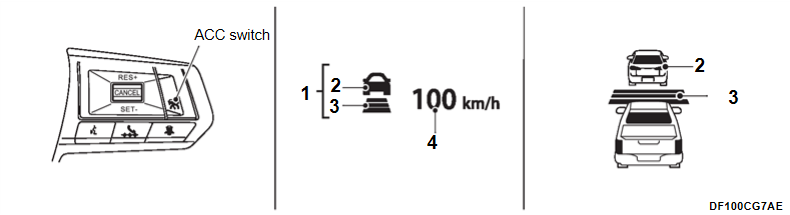 symbolInformation display status1ACC status indicatorON (Gray)2Vehicle ahead detection indicatorOFF3Set distance indicatorLong mode4Set vehicle speed indicator“———”“km/h”
- Check that the vehicle information display on the combination meter indicates the set standby mode.
- Press the ACC switch and check that the ACC indicator turns off when ACC is set to OFF.
- Check that the ACC indicator is OFF after the engine is started again.
)
2.CHECK FOR DISTANCE SWITCH
- Start the engine.
- Press the ACC switch (less than 1.5 seconds).
- Press the DISTANCE switch.
- Check that the set distance indicator changes display in order of: (Long)→(Middle)→(Short).
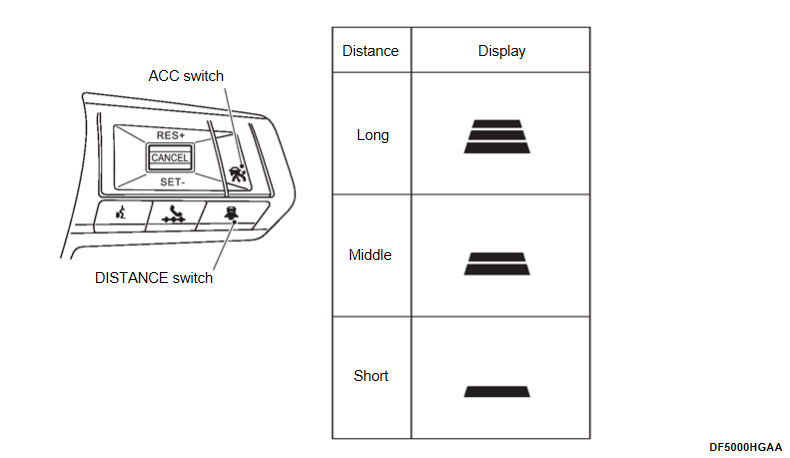
 NOTE:When the ACC switch is turned ON, initial setting set to (Long).
)
3.CHECK FOR RES+, SET-, AND CANCEL SWITCHES
- Check that RES+, SET-, CANCEL switches are operated smoothly.
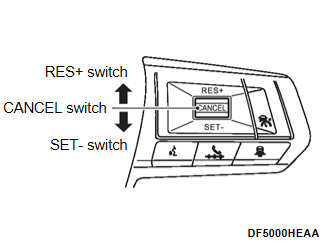
- Check that switches come up as hand is released from the switches.
)
4.SET CHECKING (1)
- Start the engine.
- Press the ACC switch (less than 1.5 seconds) and turn the ACC system ON.
- Drive the vehicle at 30 km/h or more.
- Push down the SET- switch.
- Check that the desired speed is set and ACC control starts when releasing SET- switch.
NOTE:The set vehicle speed is indicated on the set vehicle speed indicator in the ACC system display on the information display.
5.CHECK FOR INCREASE OF CRUISING SPEED (1)
- Set the ACC at desired speed.
- Check that the set speed increases by 1 km/h as RES+ switch is pushed up.
CAUTION:
Never set the cruise speed exceeding the posted speed limit.
NOTE:The maximum set speed of the ACC is 144 km/h.
6.CHECK FOR DECREASE OF CRUISING SPEED (1)
- Set the ACC at desired speed.
- Check that the set speed decreases by 1 km/h as SET- switch is pushed down.
NOTE:- The system will cancel and a warning chime will sound if the speed is below approximately 25 km/h. <Up to 24 Model year>
- The minimum set speed is approximately 30 km/h. <From 25 Model year>
- While driving the vehicle at 30 km/h or less, the control is automatically canceled when there is no vehicle-travelling-ahead. <From 25 Model year>
<Up to 24 Model year>
<From 25 Model year>
7.SET CHECKING (2)
- Stop the vehicle.
- Drive the vehicle at less than approximately 30 km/h.
- Push down the SET- switch when the system detects a vehicle ahead.
- Check that the ACC is performed so that the vehicle maintains a proper distance according to the vehicle speed [maximum: approximately 30 km/h] when releasing SET- switch.
NOTE:- The ACC cannot be set when the vehicle speed is less than 30 km/h and when a vehicle ahead is not detected.
- While driving the vehicle at 30 km/h or less, the control is automatically canceled when there is no vehicle-travelling-ahead.
- The set vehicle speed indicator in the ACC system display on the information display is set to 30 km/h.
8.CHECK FOR INCREASE OF CRUISING SPEED (2)
- Set the ACC when the vehicle speed is less than approximately 30 km/h and when a vehicle ahead is detected.
- Check that the set speed increases by 1 km/h as RES+ switch is pushed up.
CAUTION:
Never set the cruise speed exceeding the posted speed limit.
NOTE:The maximum set speed of the ACC is 144 km/h.
9.CHECK FOR DECREASE OF CRUISING SPEED (2)
- Set the ACC when the vehicle speed is less than approximately 30 km/h and when a vehicle ahead is detected.
- Set the set vehicle speed to the desired vehicle speed according to “check for increase of cruising speed”.
- Check that the set speed decreases by 1 km/h as SET- switch is pushed down.
NOTE:The minimum the set speed is approximately 30 km/h.
10.CHECK FOR CANCELLATION OF ACC
Check that the ACC is canceled when performing the following operations.
- When the brake pedal is depressed after ACC is set and the vehicle is driven.
- When the selector lever is in the “N” position after ACC is set and the vehicle is driven.
- When the ACC switch is turned OFF after ACC is set and the vehicle is driven.
- When the CANCEL switch is pressed after ACC is set and the vehicle is driven.
11.CHECK FOR RESTORING SPEED THAT IS SET BY ACC BEFORE CANCELLATION
Check that the vehicle restores the previous speed kept before the system deactivation when performing the following operations.
- Drive the vehicle when the ACC is set and depress the brake pedal to cancel the control. Check that the vehicle restores the previous vehicle speed kept before the system deactivation when pushing up the RES+ switch.
- Drive the vehicle when the ACC is set and shift the selector lever to the “N” position to cancel the control. Check that the vehicle restores the previous vehicle speed kept before the system deactivation when shifting the selector lever to the “D” position and pushing up the RES+ switch.
- Drive the vehicle when the ACC is set and press the CANCEL switch to cancel the control. Check that the vehicle restores the previous vehicle speed kept before the system deactivation when pushing up the RES+ switch.
INSPECTION END