FUNCTION AND OPERATION
N114180020000200ENG
FUNCTION
Bird's eye-view function
- The image from the 4 cameras is cut out and converted into the overhead view, and the surroundings of the vehicle is displayed in bird's eye-view .
Birds-eye view display image
)
Birds-eye view display area
)
Front-view function
- The front view image is from the front-view camera.
- When the selector lever is in any position other than the reverse position, the front view is displayed by pressing the “CAMERA” switch. It improves the visibility of obstacles in front of the vehicle and helps driving by the images displayed from bird's-eye view and front-side view. The front wide view function allows the display of an image with an approximately 180° horizontal angle.
- Display the vehicle width guiding line and vehicle distance guiding line in front view and display the predictive course line according to the steering angle.
- If the steering angle is within approximately 90 degrees, the predictive course lines on the left/right side are displayed. If the steering angle is exceeding approximately 90 degrees, only the predictive course line on the outside (in the opposite side of steering direction) is displayed.
- Camera-ECU receives the steering angle signal from ASTC-ECU via CAN communication.
- Camera-ECU controls the direction of the predictive course line according to the steering sensor angle signal.
Front-view guiding lines
)
Rear-view function
- The rear view image is from the rear-view camera.
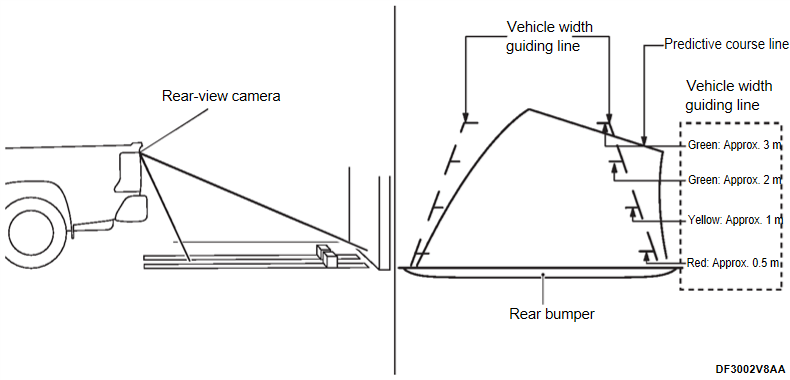
- When the selector lever is in the reverse position, the rear view is displayed. Backing and parking are improved by the images from bird's eye-view and front-side view. The rear wide view function allows the display of an image with an approximately 180° horizontal angle.
- Display the vehicle width guiding line and vehicle distance guiding line in rear view and display the predictive course line according to the steering angle.
- The predictive course line is not displayed at the steering neutral position.
- Camera-ECU receives the steering angle signal from ASTC-ECU via CAN communication.
- Camera-ECU controls the direction and distance of predictive course line according to the steering angle sensor signal.Rear-view guiding lines
)
Side-view function
- The front-side view image is from the side-view camera RH.
- In front-side view, display the vehicle distance guiding line and vehicle width guiding line.
Front-side view area and guiding line
)
Moving object detection (MOD) function
- Moving Object Detection (MOD) is a function that notifies the driver of the presence of moving objects in the area around the vehicle. MOD detects moving objects from camera image, illuminates frame of view in yellow whenever “MOD” icon is displayed in green, and sounds buzzer.
- MOD detects moving objects while camera image is displayed on multivision display.
- Camera-ECU performs the following process when moving objects are detected.
- Superimposes yellow frame line on camera image signal and outputs them to multivision display by LVDS.
- Transmits MOD beep sound output request signal to combination meter via CAN communication.
- Combination meter that receives the MOD beep sound output request signal from camera-ECU, and outputs buzzer drive signal to buzzer.
- Camera-ECU detects moving objects from camera image according to an image recognition method called optical flow.
- MOD does not detect a background as a moving object when the vehicle moves (when whole screen moves), but detects a moving object when an actual moving object is displayed on screen.
- MOD can be set to permanent OFF by the following operation.
- Permanent OFF: Settings can be performed on the information display of the combination meter.
- Colour of “MOD” icon indicates whether or not MOD is operative. “MOD” icon is displayed as shown in the following table. when MOD is operative, “MOD” icon is displayed in green. when MOD is not operative, “MOD” icon is displayed in grey. MOD icon is not displayed when MOD is OFF by “Settings”.ViewShift positionP or N positionD positionR position“MOD” icon displayBird's-eye view and front viewBird's-eye viewGreenGrey–Front viewGreyGreenSide view and front viewSide view××–Front viewGreyGreenBird's-eye view and rear viewBird's-eye viewGreen–GreyFront viewGreyGreenSide view and rear viewSide view×–×Rear viewGreyGreenRear wide view––GreenFront wide viewGreyGreen–×: Icon is not displayed.–: View is not displayed in each shift position (D position and R position).
- MOD illuminates frame of view in yellow and sounds buzzer, when any of the conditions in the following table are satisfied.Operation ConditionView where MOD is operativeShift positionVehicle speedP or N position0 km/hBird's-eye viewD position0 km/h or more - less than 8 km/h
- Front view
- Front wide view
R position0 km/h or more - less than 8 km/h- Rear view
- Rear wide view
- MOD does not operate or stops operation when any of the conditions in the following table are satisfied.Operation stop conditionNoteDoor open
- MOD does not stop operation for front view and front wide view.
- Operation stops for rear view and rear wide view while back door is open.
- Operation stops for Bird's-eye view when any door is open.
Door mirror expanding/retractingExpanding/retracting status of door mirror is judged according to operation signal of door mirror motor transmitted from door mirror (driver side) to camera-ECU.
MAC (Message Authentication Code)
MAC (Message Authentication Code) is a function that prevents unauthorised communication from other than the ECU with MAC function by secure authentication communication. Camera-ECU can write a MAC key required for communication between the ECUs and perform MAC diagnosis.