VEHICLE-TO-VEHICLE DISTANCE CONTROL MODE FUNCTION <25 MODEL YEAR (SUPPLEMENT)>
N102480100000500ENG
FUNCTION DESCRIPTION
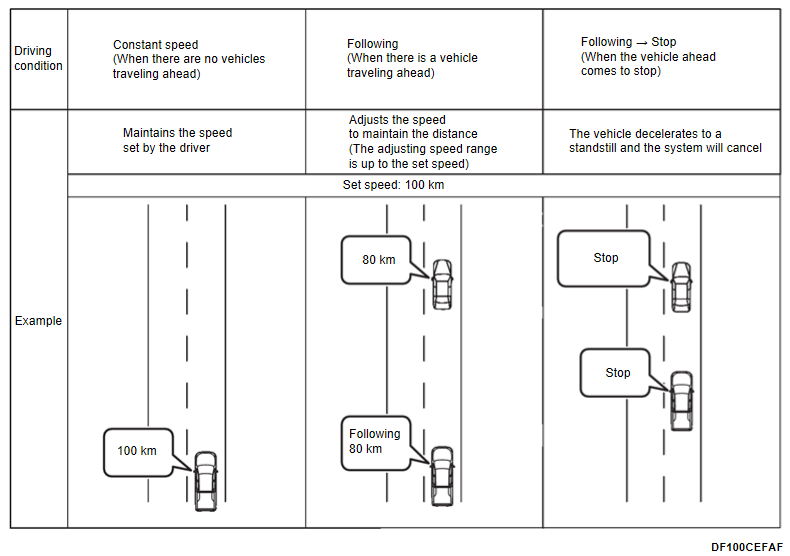
- The vehicle-to-vehicle distance control mode is designed to maintain a selected distance from the vehicle in front of own vehicle and can reduce the speed to match a slower vehicle ahead.
- The driver can select the distance from the vehicle ahead (Long/Middle/Short).
- If the status is the set wait condition and the vehicle speed is between approximately 30 and 144 km/h, when the SET - switch is pressed, the system records the vehicle speed and starts the control. If the vehicle speed is approximately 30 km/h or less and a vehicle ahead is detected when the SET switch is pressed, a vehicle speed of 30 km/h is set.
- The system decelerates the vehicle as necessary and if the vehicle ahead comes to a stop, the vehicle decelerates to a standstill. However, the system can only apply up to 40% of the vehicle’s total braking power.
- The system cancels and a warning chime sounds if the speed is below approximately 30 km/h and a vehicle is not detected ahead.
- The vehicle-to-vehicle distance control mode operates as follows:
- When there are no vehicles traveling ahead, the system maintains the speed set by the driver. The set vehicle speed range is between approximately 30 and 144 km/h.
- When there is a vehicle traveling ahead, the system adjusts the speed to maintain the distance, selected by the driver, from the vehicle ahead. If the vehicle ahead comes to a stop, the vehicle decelerates to a standstill. The system will cancel once it judges a standstill with a warning chime.
- When the vehicle traveling ahead moves to a different traveling lane, the system accelerates and maintains vehicle speed up to the set speed.
 CAUTION:
- Do not use the ACC system if the cargo bed is heavily loaded as enough braking may not be applied.
- This system should only be used when traffic conditions allow vehicle speeds to remain fairly constant or when vehicle speeds change gradually.
- If a vehicle moves into the traveling lane ahead or if a vehicle traveling ahead rapidly decelerates, the distance between vehicles may become closer because the system cannot decelerate the vehicle quickly enough. If this occurs, the system sounds a warning chime and blinks the system display to notify the driver to take necessary action.
- The vehicle-to-vehicle distance control mode does not control vehicle speed or warn the driver when the driver approaches stationary and slow moving vehicles. The driver must pay attention to vehicle operation to maintain proper distance from vehicles ahead when approaching toll gates or traffic congestion.
- The vehicle may not maintain the set speed on winding or hilly roads.
 NOTE:
- When the accelerator pedal is depressed, the brake operation and the warning are not performed by the ACC system.
- The vehicle-to-vehicle distance control mode has the following functions:
)
Cut-in detection
If a vehicle moves into own traveling lane near own vehicle, the vehicle-to-vehicle distance control mode informs the driver by blinking the vehicle ahead detection indicator.
Approach warning
If own vehicle comes closer to the vehicle ahead due to rapid deceleration of that vehicle or if another vehicle cuts in, the system warns the driver with the chime and ACC system display.
CAUTION:
- The warning chime does not sound in some cases when there is a short distance between vehicles. Some examples are:
- When the vehicles are traveling at the same speed and the distance between vehicles is not changing.
- When the vehicle ahead is traveling faster and the distance between vehicles is increasing.
- When a vehicle cuts in near own vehicle.
- The warning chime does not sound when:
- Own vehicle approaches other vehicles that are parked or moving slowly.
- The accelerator pedal is depressed, overriding the system.
Acceleration when passing
- When the vehicle-to-vehicle distance control mode system is engaged above 70 km/h and following a slower vehicle (below set speed), and the turn signal is activated to the left<LHD> / right <RHD>, the system automatically starts to accelerate the vehicle to help initiate passing on the left <LHD> / right <RHD> and begins to reduce the distance to vehicle directly ahead. Only the left <LHD> / right <RHD> side turn signal operates this feature.
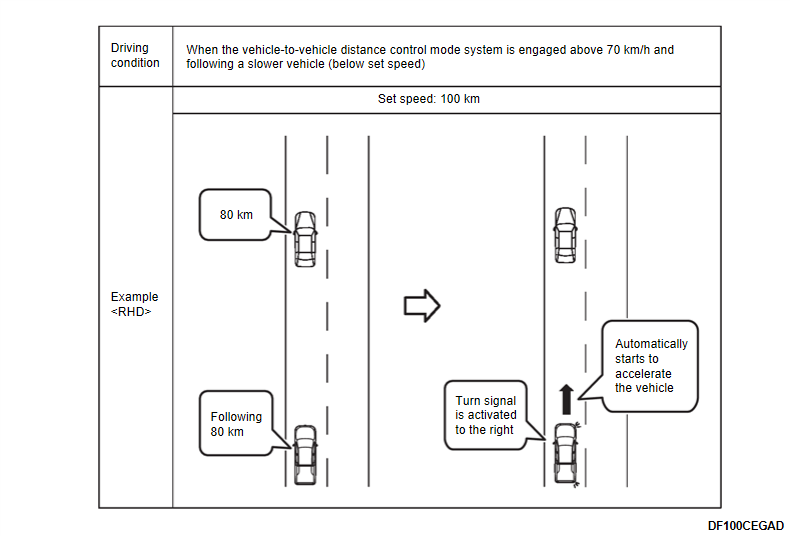
- As the driver steers the vehicle and moves into the passing lane, if no vehicle is detected ahead the system continues to accelerate to the set speed. If another vehicle is detected ahead, then the vehicle accelerates up to the following speed of that vehicle.
- If the vehicle is not steered into the right lane to pass, the acceleration stops after a short time and regains the set following distance.
- Acceleration can be stopped at any point by depressing the brake pedal or the CANCEL switch on the steering wheel.
)
OPERATION DESCRIPTION
- When ACC is OFF, pressing the ACC steering wheel switch for less than 1.5 seconds displays the ACC status, and the set wait condition is engaged.
- Driving support control unit performs the control as per the following:Constant speedThe driving support control unit compares the set vehicle speed with the current vehicle speed, transmits the command to Engine-ECU via CAN communication to reach the set vehicle speed, and controls the electric throttle control actuator.FollowingThe driving support control unit sends commands to the Engine-ECU and the ASTC-ECU and controls the vehicle speed for keeping the proper distance between vehicles according to the vehicle speed changes of the vehicle ahead.Following → StopThe driving support control unit sends commands to the ASTC-ECU and stops the vehicle. After the vehicle stops, the ACC system is automatically cancelled.
- When the driving support control unit judges that a vehicle moves into own traveling lane near own vehicle by the distance sensor signal from the FCM-ECU, it transmits the meter display signal to the combination meter to turn ON the vehicle ahead detection indicator.
- When the driving support control unit judges that own vehicle comes closer to the vehicle ahead due to rapid deceleration of that vehicle or another vehicle cuts in by the distance sensor signal from the FCM-ECU, it performs the following operations:
- Transmits the meter display signal to the combination meter to turn ON ACC system display.
- Transmits the buzzer output signal to the combination meter to sound the buzzer.
- When the driving support control unit judges that the turn signal is activated to the right while the own vehicle is following a slower vehicle (below set speed) at 70 km/h or more, it transmits the command to the ECM to accelerate the vehicle.
OPERATION CONDITION
- ACC system: ON
- Vehicle speed: Between approximately 30 and 144 km/h
CANCEL CONDITION
- Push the CANCEL switch
- Tap the brake pedal
- Push the ACC switch to turn the system OFF (The ACC status indicator turn OFF)
- The vehicle ahead is not detected and own vehicle is traveling below the speed of 25 km/h
- The vehicle decelerates to a standstill by the ACC system and the system judges standstill
- The shift lever is not in the "D" position or manual shift mode
- The parking brake is applied
- The ASC system is turned OFF
- The FCM applies harder braking
- ASC (including the traction control system) operates
- The GRAVEL mode, SNOW mode, MUD mode, SAND mode or ROCK mode is selected (4WD models)
- A wheel slips
- When distance measurement becomes impaired due to adhesion of dirt or obstruction to the distance sensor
- When the radar signal is temporarily interrupted