VEHICLE-TO-VEHICLE DISTANCE CONTROL MODE FUNCTION
N102480040000O00ENG
SWITCH NAME AND FUNCTION
)
No. | Switch name | Description |
1 | ACC MAIN switch | ACC MAIN switch to activate the system (Press for less than 1.5 seconds) |
2 | CANCEL switch | Pressing the switch cancels ACC control |
3 | RES+ switch | Resumes set speed or increases speed incrementally
|
4 | SET- switch | Sets desired cruise speed or reduces speed incrementally
 NOTE: The minimum set speed is 30 km/h |
5 | DISTANCE switch | Changes the following distance from: Long, Middle, Short |
SYSTEM DISPLAY AND WARNING
SYSTEM DISPLAY
)
No. | Switch name | Description |
1 | ACC status indicator | Indicates the status of ACC system |
2 | Vehicle ahead detection indicator | Indicates whether it detects a vehicle ahead |
3 | Set distance indicator | Indicates the selected distance between vehicles set with the DISTANCE switch |
4 | Speed control status indicator/warning | The vehicle speed control status is indicated by different colors and shapes |
SYSTEM CONTROL CONDITION DISPLAY
Quickly push (less than 1.5 seconds) and release the ACC MAIN switch ON.
Condition | Display on information display | ||
Standby mode | ACC status indicator: Gray Set vehicle speed indicator: Gray 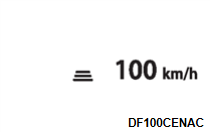 | ||
Set distance indicator: Gray 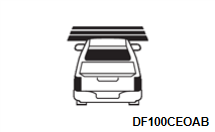 | |||
Control mode | Without a vehicle ahead | Set vehicle distance (Long) | ACC status indicator: Green Set vehicle speed indicator: Green |
Set distance indicator: Green | |||
Set vehicle distance (Middle) | ACC status indicator: Green Set vehicle speed indicator: Green 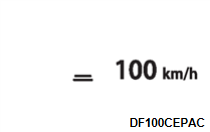 | ||
Set distance indicator: Green 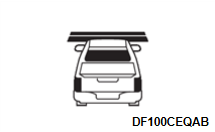 | |||
Control mode | Without a vehicle ahead | Set vehicle distance (Short) | ACC status indicator: Green Set vehicle speed indicator: Green 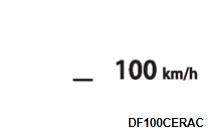 |
Set distance indicator: Green 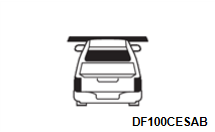 | |||
When the vehicle speed exceeds the set speed | ACC status indicator: Green Set vehicle speed indicator: Green (Blink) 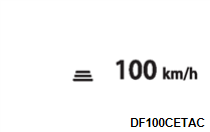 | ||
Control mode | With a vehicle ahead | Set vehicle distance (Long) | ACC status indicator: Green Set vehicle speed indicator: Green 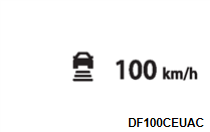 |
Set distance indicator: Green 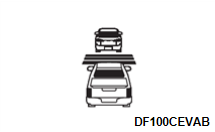 | |||
Set vehicle distance (Middle) | ACC status indicator: Green Set vehicle speed indicator: Green 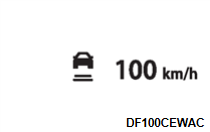 | ||
Set distance indicator: Green 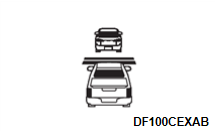 | |||
Control mode | With a vehicle ahead | Set vehicle distance (Short) | ACC status indicator: Green Set vehicle speed indicator: Green 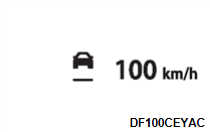 |
Set distance indicator: Green 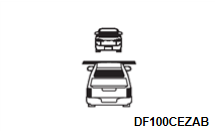 | |||
When the vehicle speed exceeds the set speed | ACC status indicator: Green Set vehicle speed indicator: Green (Blink) 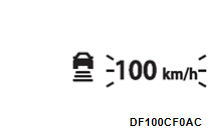 | ||
APPROACH WARNING DISPLAY
If own vehicle comes closer to a vehicle ahead due to rapid deceleration of that vehicle or if another vehicle cuts in, the system warns the driver with the chime and ACC system display. Decelerate by depressing the brake pedal to maintain a safe vehicle distance if:
- The chime sounds.
- The vehicle ahead detection indicator blinks in yellow.
The warning chime may not sound in some cases when there is a short distance between vehicles. Some examples are:
- When the vehicles are traveling at the same speed and the distance between vehicles is not changing.
- When the vehicle ahead is traveling faster and the distance between vehicles is increasing.
- When a vehicle cuts in at near own vehicle.
The warning chime will not sound when own vehicle approaches vehicles that are parked or moving slowly.
The warning chime will not sound when the accelerator pedal is depressed, overriding the system.
The approach warning chime may sound and the system display may blink when the FCM-ECU detects some reflectors which are fitted on vehicles in other lanes or on the side of the road.
This may cause the ACC system to decelerate or accelerate the vehicle.
The FCM-ECU may detect these objects when the vehicle is driven on winding roads, hilly roads or when entering or exiting a curve.
The FCM-ECU may also detect reflectors on narrow roads or in road construction zones.
In these cases, driver will have to manually control the proper distance ahead of own vehicle.
Also, the sensor sensitivity can be affected by vehicle operation (steering maneuver or driving position in the lane) or traffic or vehicle condition (for example, if a vehicle is being driven with some damage).
Condition | Display on information display |
When own vehicle comes closer to the vehicle ahead and it is judged that the distance between the vehicles is not sufficient | Vehicle ahead detection indicator: Yellow (Blink) 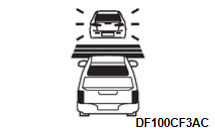 |
WARNING LIGHT AND AUTOMATIC CANCELLATION DISPLAY
Condition | Description | Display on information display |
| A chime sounds and the control is automatically canceled. NOTE:When the condition is no longer present, turn the system OFF. Turn the ACC system back on to use the system. | Currently Not Available |
| A chime sounds and the control is automatically canceled. NOTE:When the conditions listed above are no longer present, turn the system OFF. Turn the ACC system back on to use the system. | Unavailable Slippery Road |
Parking brake is applied | A chime sounds and the control is automatically canceled. NOTE:After releasing the parking brake, turn the system OFF . Turn the ACC system back on to use the system. | Not Available, Parking Brake On |
When the driver’s seat belt is not fastened | A chime sounds and the control is automatically canceled. NOTE:After fastened the seat belt, turn the system OFF. Turn the ACC system back on to use the system. | Not Available, Seat Belt Not Fastened |
When the FCM-ECU is dirty, making it impossible to detect a vehicle ahead | A chime sounds and the control is automatically canceled. NOTE:
| Temporarily Disabled Front Radar Blocked |
When the system is malfunctioning | A chime sounds and the control is automatically canceled. NOTE:
| System fault See Owner's Manual |