CONVENTIONAL (FIXED SPEED) CRUISE CONTROL MODE FUNCTION
N102480050000400ENG
SWITCH NAME AND FUNCTION
)
No. | Description | Function |
1 | ACC MAIN switch | Master switch to activate the system (Press for more than 1.5 seconds) |
2 | CANCEL switch | Deactivates system without erasing set speed |
3 | RES+ switch | Resumes set speed or increases speed incrementally |
4 | SET− switch | Sets desired cruise speed or reduces speed incrementally |
SYSTEM DISPLAY AND WARNING
)
No. | Description | Function |
1 | Cruise indicator | Indicates the condition of the conventional (fixed speed) cruise control mode of the ACC system depending on a color |
2 | Set vehicle speed indicator | Indicates the set vehicle speed |
SYSTEM CONTROL CONDITION DISPLAY
Push and hold the ACC MAIN switch for longer than approximately 1.5 seconds. This mode will be in a standby state for setting.
Condition | Display on information display |
Standby mode | Cruise indicator : Gray Set vehicle speed indicator : — 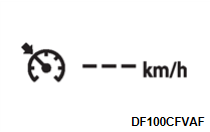 |
Control mode | Cruise indicator : Green Set vehicle speed indicator : Green 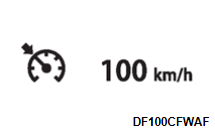 |
WARNING AND AUTOMATIC CANCELLATION DISPLAY
Condition | Description | Display on information display |
|
 NOTE:
| Unavailable Slippery Road |
| A chime sounds and the control is automatically canceled. NOTE:When the condition is no longer present, turn the system OFF. Turn the ACC system back on to use the system. | Currently Not Available |
Parking brake is applied | A chime sounds and the control is automatically canceled. NOTE:After releasing the parking brake, turn the system OFF . Turn the ACC system back on to use the system. | Not Available, Parking Brake On |
When the ACC system is malfunctioning |
NOTE:Turn the engine OFF and restart engine. If there is no malfunction, it is possible to set the system | System fault See Owner's Manual |